HUARUI
Dry-Type Transformer Temperature Controller Parameter Settings + Complete Operation Guide
Hot Weather!!! 5-Step Correct Usage Procedure for Dry-Type Transformer Temperature Controller
Step 1: First Power-On of Equipment
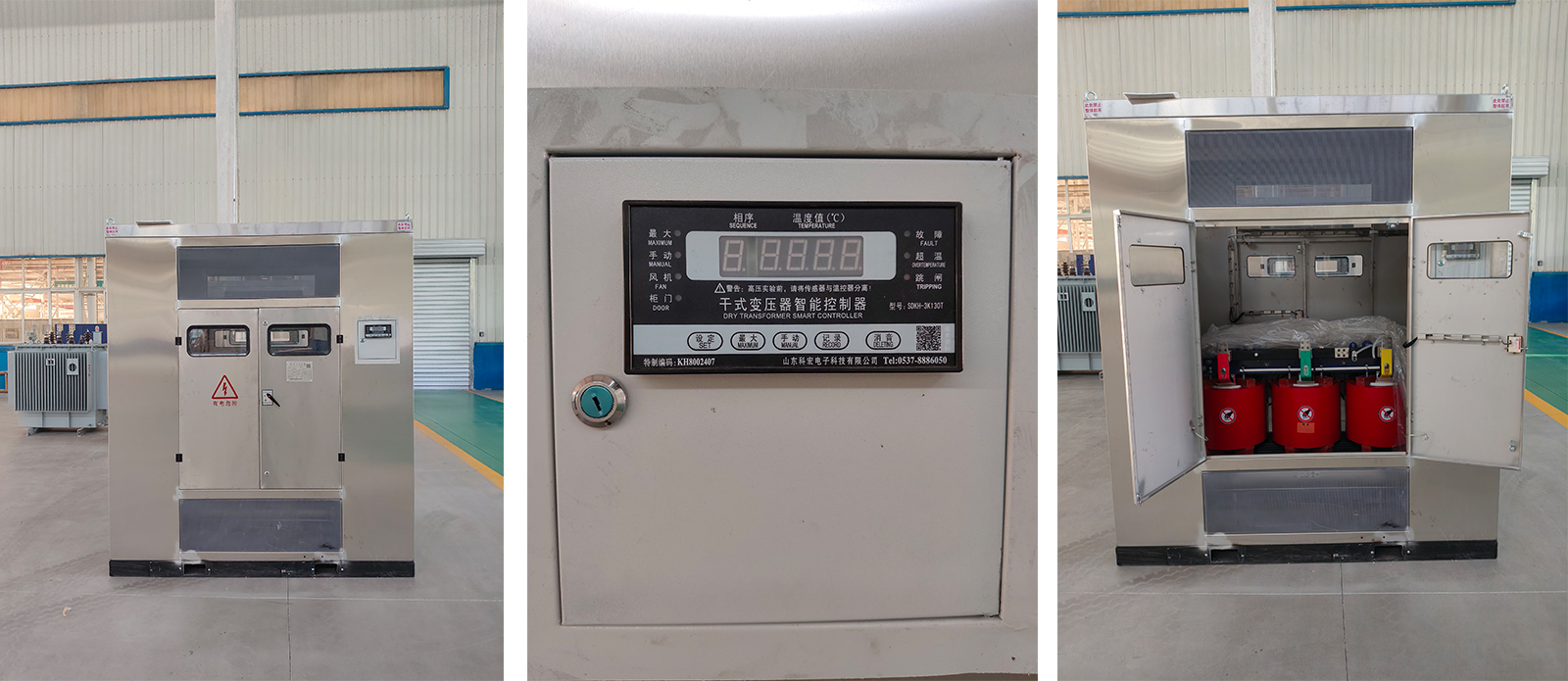
Connect the temperature controller properly, then turn on the power. The controller will enter normal operation mode. The screen's phase area will display the real-time temperatures of the A/B/C three-phase windings respectively.
Step 2: Check Maximum Value & Three-Phase Cycling
Press the "MAX" button on the panel. The screen will display only the highest temperature among the three-phase windings and its corresponding phase, while the MAX indicator light illuminates. Press the "MAX" button again to switch to three-phase cyclic display mode, and the MAX indicator light turns off.
Step 3: Manual Fan Start/Stop Operation
When automatic start/stop is not engaged, press the "MANUAL" button to force-start the fan. The manual indicator light and fan indicator light will both illuminate. Press the "MANUAL" button again to stop the fan, and all display indicators will turn off.
Step 4: Parameter Setting Value Inquiry and Modification
Press the "SET" button. The screen displays "P-000" as the initial password. Modify the password to "P-101". Press the "SET" button to set parameters to 1. Parameter No. 1-080 represents the fan automatic stop temperature (factory default: 70℃ or 80℃). Parameter No. 2-100 represents the fan automatic start temperature (factory default: 90℃ or 100℃). Parameter No. 3-130 represents the coil over-temperature alarm temperature (factory default: 130℃). Parameter No. 4-150 represents the coil trip temperature (factory default: 150℃).
During the entire parameter setting process, if there is no button operation for 10 consecutive seconds, the controller will automatically exit the parameter setting interface and return to the normal temperature display interface.
Step 5: Retrieve and View Historical Operation Records
Press the "RECORD" button. The screen displays "HL1-0", representing the retrieval of the most recent power-off record. Continue pressing the "RECORD" button, and the screen will sequentially display the most recent records for Phase A, Phase B, and Phase C. When viewing operation records, if there is no operation for 20 consecutive seconds, the screen will automatically return to the normal temperature display interface.
The Benefits of Using a Dry-Type Transformer Temperature Controller Correctly
I. Ensuring Equipment Operation Safety
① Prevents winding overheating burnout: The temperature controller monitors the winding temperature in real time. When the temperature approaches the insulation material's withstand limit (155℃ for Class F, 180℃ for Class H), it issues an over-temperature alarm or trip command, effectively avoiding turn-to-turn short circuits, insulation breakdown, or even fire accidents caused by overheating.
② Provides early warning of potential faults: By observing whether the three-phase temperatures are balanced and whether the temperature rise rate is abnormal, issues such as fan failure, overload operation, and poor ventilation can be detected early, nipping potential accidents in the bud.
II. Extending Transformer Service Life
③ Slows down insulation aging: The aging rate of dry-type transformer insulation materials is directly related to temperature—for every 8-10℃ exceeding the rated limit, the service life is halved. Correctly setting the temperature controller (e.g., fan starts at 100℃, stops at 80℃) keeps the winding temperature within a reasonable range, ensuring a 30-year design life.
④ Avoids unnecessary thermal shock: Frequent and drastic temperature fluctuations exacerbate the expansion and contraction of insulation materials, leading to micro-cracks. The temperature controller maintains relatively stable temperature by precisely controlling fan start/stop.
III. Improving Operational Economy
⑤ Energy saving and consumption reduction: The fan automatically starts when the temperature reaches 100℃ and automatically stops at 80℃, preventing prolonged ineffective fan operation and saving electrical energy consumption. A single fan typically consumes several hundred watts to one kilowatt; on-demand start/stop can save considerable electricity costs annually.
⑥ Improves power supply reliability: Prevents unplanned power outages caused by over-temperature tripping, ensuring normal power supply for production and daily life. For primary load locations such as data centers and hospitals, the reliable operation of the temperature controller is directly related to power supply continuity.
IV. Reducing Operation and Maintenance Costs
⑦ Enables unattended operation: Intelligent temperature controllers feature automatic monitoring, automatic control, fault alarm, and remote communication (RS485 interface) functions, and can be integrated into power distribution automation systems, significantly reducing the frequency of manual inspections.
⑧ Enables rapid fault location: The controller's "black box" function records the three-phase winding temperature and operating status before power failure, allowing maintenance personnel to quickly analyze the cause of faults and shorten repair time.